2025-01-29 20:34:34 -06:00
2024-11-19 18:49:44 -06:00
idk
2024-01-04 16:09:38 +00:00
idk
2023-12-19 16:17:12 +00:00
idk
2023-10-24 17:16:38 +00:00
2024-10-15 17:33:18 +00:00
idk
2024-01-04 17:13:16 +00:00
idk
2024-01-19 22:57:02 +00:00
idk
2024-01-20 00:07:40 +00:00
idk
2023-11-30 17:08:14 +00:00
idk
2023-11-24 03:27:59 +00:00
idk
2024-05-11 22:05:28 +00:00
idk
2023-11-05 23:42:04 +00:00
yes
2025-01-17 20:24:50 +00:00
fun
2023-10-24 14:57:44 +00:00
idk
2024-04-15 19:10:50 +00:00
1
2024-02-29 18:29:27 +00:00
idk
2023-11-30 15:25:22 +00:00
2024-10-11 13:41:15 +00:00
idk
2024-01-04 17:13:16 +00:00
idk
2024-01-03 15:49:22 +00:00
1
2024-02-09 18:36:23 +00:00
idk
2024-01-31 15:34:11 +00:00
idk
2024-01-18 17:13:40 +00:00
idk
2024-01-19 16:14:40 +00:00
idk
2023-12-12 16:24:52 +00:00
hi
2024-12-11 17:16:20 +00:00
2024-10-16 01:39:48 +00:00
idk
2023-12-16 22:36:37 +00:00
idk
2023-10-29 23:45:07 +00:00
1
2023-12-15 20:18:44 +00:00
idk
2023-12-13 15:33:19 +00:00
1
2023-12-12 14:52:35 +00:00
2024-11-07 18:31:38 +00:00
2025-01-17 00:13:17 +00:00
idk
2024-01-11 16:17:50 +00:00
1
2024-03-26 16:54:29 +00:00
2025-01-28 08:19:12 -06:00
1
2025-01-29 21:01:26 +00:00
1
2025-01-29 21:01:26 +00:00
1
2025-01-29 21:01:26 +00:00
1
2025-01-29 17:01:58 +00:00
1
2025-01-29 17:01:58 +00:00
1
2025-01-29 17:01:58 +00:00
idk
2024-01-09 00:24:38 +00:00
2023-10-05 17:24:18 +00:00
idk
2024-04-01 18:29:39 +00:00
2024-10-14 23:56:21 +00:00
isd
2024-01-14 22:02:18 +00:00
idk
2024-01-10 01:57:14 +00:00
idk
2024-01-29 15:06:26 +00:00
idk
2024-01-11 23:43:36 +00:00
idk
2024-02-12 16:29:26 +00:00
2025-01-10 14:18:18 +00:00
2025-01-14 14:27:23 +00:00
idk
2023-11-16 15:21:17 +00:00
idk
2023-12-07 14:50:56 +00:00
1
2025-01-29 21:01:26 +00:00
1
2024-05-29 14:52:06 +00:00
1
2024-10-10 16:14:54 +00:00
hi
2024-12-13 16:52:01 +00:00
2024-12-13 16:46:59 +00:00
1
2024-05-29 17:09:32 +00:00
2024-12-13 16:46:59 +00:00
2025-01-14 12:30:36 -06:00
2024-01-06 12:02:20 -06:00
2024-10-15 01:32:42 +00:00
2024-01-09 23:22:17 +00:00
1
2024-04-04 17:15:23 +00:00
1
2024-03-26 13:08:34 +00:00
1
2024-04-04 14:51:45 +00:00
ifk
2024-02-02 14:59:45 +00:00
idk
2023-11-06 02:25:21 +00:00
idk
2024-02-04 23:43:12 +00:00
1
2024-03-01 04:29:32 +00:00
2024-01-09 23:22:17 +00:00
2024-10-10 17:24:11 +00:00
hi
2024-10-03 03:41:39 +00:00
idk
2023-11-16 15:31:55 +00:00
idk
2024-01-03 15:49:22 +00:00
2024-05-15 17:13:03 +00:00
idk
2024-01-11 16:17:50 +00:00
ok
2024-01-31 15:35:02 +00:00
1
2025-01-16 17:15:50 +00:00
2024-01-09 23:22:17 +00:00
2025-01-29 20:34:34 -06:00
1
2024-04-04 14:51:45 +00:00
idk
2024-05-16 13:55:24 +00:00
1
2024-04-04 14:51:45 +00:00
1
2024-04-04 17:20:54 +00:00
idk
2024-01-09 00:24:38 +00:00
1
2025-01-29 17:01:58 +00:00
1
2025-01-16 20:24:11 +00:00
2024-01-06 11:59:18 -06:00
2025-01-28 08:17:32 -06:00
2024-01-09 23:22:17 +00:00
2024-01-09 23:22:17 +00:00
2024-10-10 17:24:11 +00:00
idk
2024-02-12 19:16:05 +00:00
2025-01-13 08:40:41 -06:00
idk
2023-12-04 18:28:34 +00:00
idk
2024-05-16 15:16:10 +00:00
2024-05-14 15:30:10 +00:00
idk
2024-05-14 15:28:26 +00:00
2024-05-14 16:58:37 +00:00
idk
2023-12-12 17:44:15 +00:00

The Best Online Gaming Site You Can Make One Of Your by Hosting

fun-miles by miles Allen and Robert Winberg The Licensed Is Under Creative Commons Attribution-NonCommercial-ShareAlike 4.0 International

How To Make Your Own Verson To Host

To host the “fun-miles” GitHub repository using Render static sites, follow these steps outlined in the flowchart:

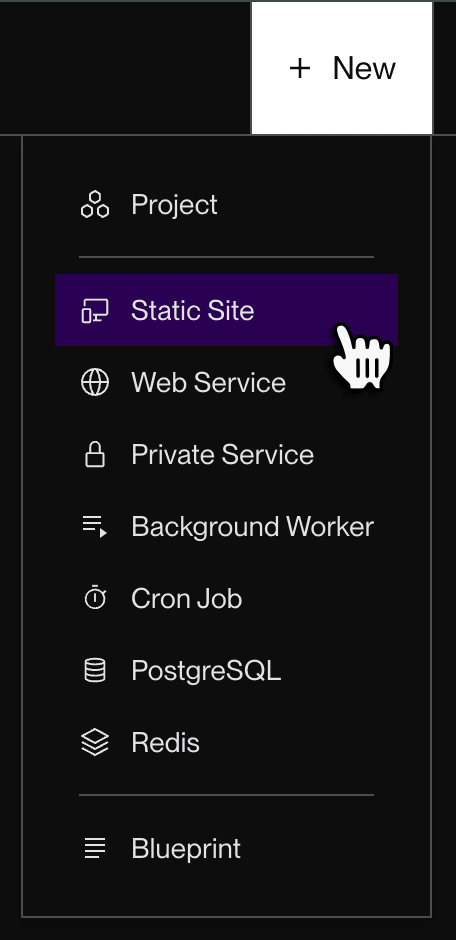
Fork the repository using github Create a Render account and create a new static site, <img src="https://render.com/docs/static/9705deafa360259a1e4342980e6efff5/7a72b/new-static-site.png" alt="Selecting Static Site from the New menu"/ width="200" height="300" >connecting it to your GitHub and then <img src="https://render.com/docs/static/2b69098df84b4909b0a2336f43542dab/978af/github-connect-repo.webp" alt="Selecting Static Site from the New menu"/ width="200" height="300" > Configure the build settings, deploy the site, and then view your live site via the provided URL.
To Contribute To The Repository, Please Follow These Steps:

Fork The Repository To Your Own GitHub Account. Create A New Branch For Your Project Or Idea. Develop Your Project Or Idea, Ensuring It Aligns With The Repository's Purpose. Commit Your Changes And Push Them To Your Forked Repository. Submit A Pull Request To The Original "Fun-Miles" Repository, By Contributing To The "Fun-Miles" Git Repository, You Can Help Make It A More Diverse And Engaging Collection Of Projects And Ideas, While Also Showcasing Your Own Idea.

Notes

[render preview] To Make A preview

Git Clone (url) Example git clone --bare https://github.com/mileswolfallen2/fun-miles

cd to a folder cd ./games/

S
Description
fun game from stuf go to fun-miles.free.nf
https://milesgd.game.gd
Readme
4.8 GiB
Languages
JavaScript 69.7%
PLSQL 25.1%
Java 2.5%
HTML 1.2%
C 0.9%
Other 0.5%